
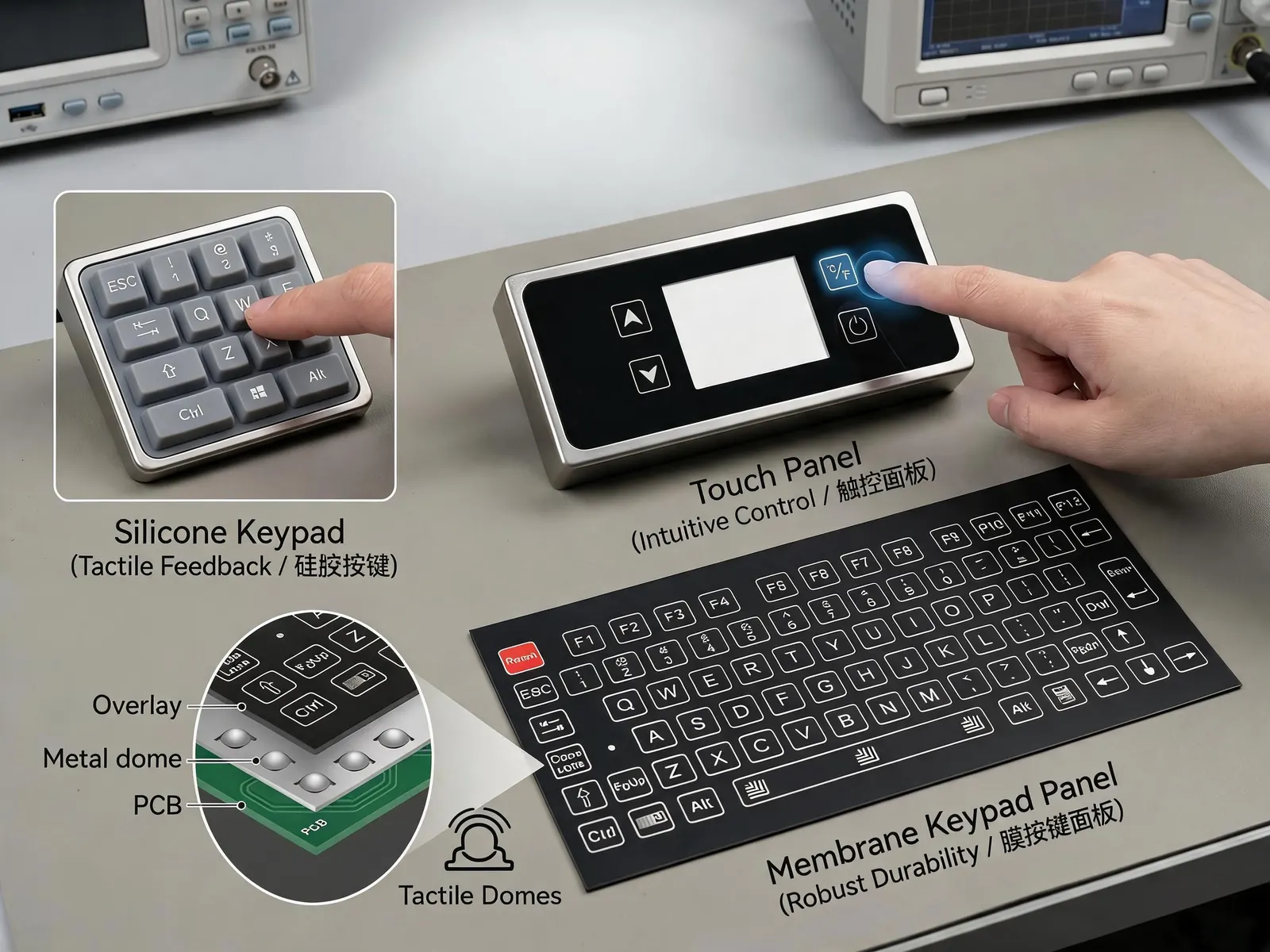
Choose a membrane switch when the equipment needs a fixed set of printed keys and a defined electrical connection. Choose a touchscreen when changing menus, information entry or a large display area justify its controller and software work. A hybrid can keep frequently used keys beside the screen. Decide per function, then verify mounted operation and the equipment's response. Specify the use conditions and acceptance evidence for glove operation, moisture, tactile feel, sealing and total project cost.
October 2026 haptic guidance and interface selection
CDTech's industrial haptic-feedback guide, published on 2026-10-13, describes how mounting and cover-glass geometry affect the sensation transmitted through a touch front. It also explains that gloves can damp that sensation and machine vibration can mask it. These are qualitative supplier observations, not a performance specification for every touchscreen or membrane switch.
For interface selection, the useful distinction is between what the hand feels and what the equipment has accepted. A dome can click before the buyer has evidence of electrical closure. A touchscreen can produce a vibration without demonstrating that the intended application action completed. A convincing sample demonstration can leave the host response untested. Record these as different acceptance questions.
Use the proposed display, cover, supports and input assembly, with the intended gloves and operating conditions. Ask the equipment owner to define the permitted command, blocked command, acknowledgement and recovery result. If haptics is proposed, its actuator, mounting, drive and application timing need an identified integration owner. A membrane-switch component quotation does not include that system approval.
Compare the task before comparing the front surface
A membrane switch may use tactile domes or a non-tactile contact construction. Specify which one is intended. A thin front can support printed legends and a flexible tail, but enclosure sealing depends on the complete edge, mounting and tail interfaces. A component alone does not establish an ingress rating for the finished equipment.
Use the task record to compare proposals:
| Equipment task or condition | Candidate interface | Evidence needed before selection |
|---|---|---|
| Repeated fixed commands with stable legends | Membrane keys, with tactile or non-tactile construction specified | Key identification, contact map, mounted operation and host acknowledgement |
| Changing menus, text entry or detailed process information | Touch display with the sensing technology identified | Intended targets and gestures, controller/host compatibility, readability and application response |
| Frequent fixed commands beside a variable display | Hybrid screen and separate keys | Clear function allocation, consistent state display and checks that the two inputs do not issue conflicting requests |
| Glove, wet or dirty use | Evaluate the proposed construction rather than a generic interface class | Actual glove and surface conditions, intentional inputs, unwanted-input checks and recovery agreed by the equipment owner |
The table is a proposed selection record. It does not report tests on a Baoshengda product or establish that one construction will pass every condition.
Keep touch technologies and feedback requirements explicit
Touch panel can mean different sensing constructions. Ask whether the proposal is resistive, projected capacitive or another specified technology, and identify the cover and controller. Do not convert a successful bare-finger trial into approval for an unspecified glove or a wet surface. The supplier and equipment owner should agree the conditions for the actual stack.
For a membrane switch, record key zones, printed legends, tactile or non-tactile construction, electrical contact arrangement and the mating connection. Confirm the available space for the overlay, spacer, circuit and any dome or support. A front photograph cannot establish the hidden construction or the circuit pinout.
Keep tactile feel, detected input and accepted equipment action separate. Physical feedback may help an operator locate or feel an input. The contact or touch-controller signal establishes another part of the path. The host must still interpret that input in its current state. An ordinary key or a haptic effect does not by itself qualify a safety-related control function. That architecture and its verification remain with the equipment owner.
Approve the assembled interface in the intended states
Start with the component drawing and then test a representative installed assembly. A loose film, an unmounted keypad or a screen animation can answer useful questions, but each has a limited approval scope.
- Identify the specimen: overlay or cover, circuit or touch sensor, supports, tail or cable, connector and relevant controller/application revision.
- Check each intended input in its allowed state. Record the detected input, visible or other specified acknowledgement and resulting equipment state.
- Check defined blocked states, repeated input and release. The equipment owner supplies the expected response and recovery method.
- Repeat the affected checks with the intended glove, viewing position and permitted cleaning or moisture condition. Record the condition rather than calling it a generic wet test.
- Inspect mounting pressure, unsupported areas, edge condition and cable routing. Recheck the input path after enclosure closure if assembly can affect it.
Choose acceptance limits and the test method before the sample is signed off. A supplier's nominal force, a demonstration video or a single successful press is not a substitute for the agreed record. Assign the component and equipment checks to the identified owners.
Compare project scope and change cost
Compare the scope included in each quotation. A membrane-switch offer may cover the printed front, circuit, tactile parts, adhesive, tail and specified component inspection. A touchscreen proposal may separate the sensor, display, cover, controller, mechanical integration and software work. Keep those inclusions beside the quoted price.
Ask what changes if key legends, the enclosure, the cover, a connector or the application layout change. Identify tooling or setup charges where applicable, the files that will be released, and the checks that must be repeated. Request the sample quantity and expected production volumes separately; no universal price, minimum order or lead time follows from this comparison.
Send the function list with the RFQ
Send the available function list and front layout through Request a Quote, with the enclosure, intended gloves or surface conditions, connection details and the person responsible for host response. Identify which checks the sample must answer and which remain open. Photos or a sketch can start the enquiry. The firm quotation and sample release should state the agreed component scope and unresolved system work.
Baoshengda's custom membrane switch page is the component-review route for fixed printed keys, construction and connection questions. A display/controller, application workflow or haptic actuator needs its own agreed supplier and acceptance scope. This guide does not promise that those functions are included in a membrane-switch order.
The retained cover is a comparison illustration of keypad and touch-interface forms. It is not evidence of a factory test, an approved assembly, an operator trial or the construction of the buyer's product.
Need help reviewing a structure?
Send your drawing, photos, application, and quantity. Baoshengda can help check the structure before sampling.
Send Drawing for Quote